

Client Vault Text Messages – Terms
Program
arisCPA (AER Enterprises, LLC) sends text messages to clients who opt in through the arisCPA Client Vault. Messages are about the client’s own account: sign-in codes, reminders to upload documents, complete the tax questionnaire or sign forms, and notices when a return is ready for review or has been filed. We do not send marketing or promotional texts.
How you opt in
Sign in to the Client Vault, open Profile › Text Messages (or the “Get updates by text?” card on your home screen), tick the box agreeing to these terms, and press Turn on texts. The box is never ticked for you. You can also ask for a single sign-in code by choosing “Text me the code” when you sign in. Consent to receive texts is not a condition of any service.
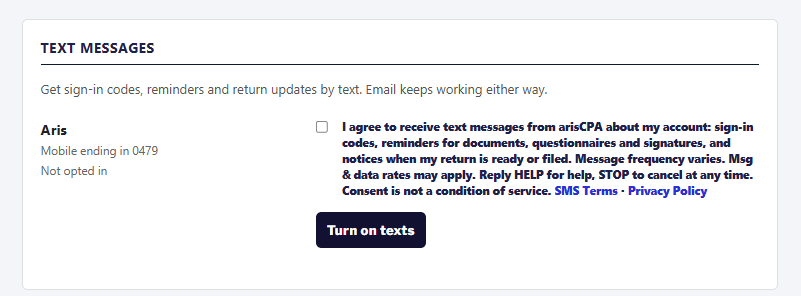
Message frequency
Message frequency varies with your account activity, typically no more than a few messages a month, and more during tax season.
Cost
Message and data rates may apply, according to your mobile plan.
How to stop
Reply STOP to any message to stop receiving texts. You will get one message confirming you are unsubscribed, and no further texts. You can also turn texts off in the Client Vault under Profile › Text Messages. To start again, reply START or turn texts back on in the Vault.
Help
Reply HELP for help, call 813-369-0479, or email appt@arisCPA.com.
Carriers
Mobile carriers are not liable for delayed or undelivered messages.
Privacy
Your mobile number and text-message consent are never sold or shared with third parties or affiliates for marketing or promotional purposes. See our Privacy Policy: https://www.ariscpa.com/privacy-policy/
Contact
arisCPA, 1914 Stanfield Drive, Brandon, FL 33511 · 813-369-0479 · appt@arisCPA.com